Today's Language Learning Application: Language Reactor (Language Learning with Netflix)

Language Reactor is a Google chrome browser extension that allows you to watch videos such as movies on Netflix (that have subtitles) with two sets of subtitles in your native language and your target language.
The extension is embedded into the chrome browser, and can be activated when watching videos, for example, in Japanese. You can turn then turn on both Japanese as well as English subtitles. The subtitles can be customized, you can download word books and look up sentence/word definitions throughout the video playback. The extension can now be used on other video sites such as YouTube.

Source: https://chrome.google.com/webstore/detail/language-reactor/hoombieeljmmljlkjmnheibnpciblicm
Language Reactor is not an application, therefore there is no option to download it on a smartphone or other mobile device. The extension must be downloaded on your Google Chrome browser through the Chrome Web Store for free. The extension, then, will pop up on your browser, and you can choose to turn it on when visiting websites such as Netflix or YouTube.
The extension allows users to learn language either passively or more actively while watching their favorite TV shows and movies, which is a great interest-stimulating method of studying.
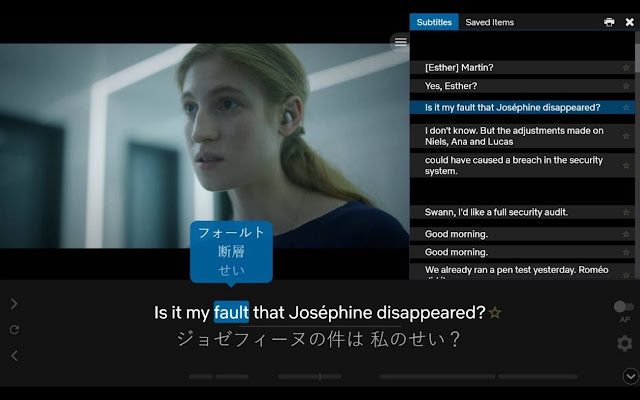
Turning the extension on brings up a full transcript of the video to the side, with double subtitles in two languages. Functions such as auto-pause will pause the video after each sentence, and holding your cursor over words in the subtitles themselves will allow you to see word definitions and other grammatical aspects of the sentence.
Source: https://chrome.google.com/webstore/detail/language-reactor/hoombieeljmmljlkjmnheibnpciblicm
You can also use the extension to see a compiled list of all words used in the video (sorted by difficulty) to see individual definitions as well as external links to other dictionaries on the web for further study.
Another function allows you to save certain words you want to remember in particular, for later access.
This online tool is especially helpful in expanding your target language vocabulary in a fun way that doesn't feel like studying.
In a classroom, Language Reactor could be used when showing educational videos or movies in class, and to highlight specific words that students might struggle with or be interested in learning more about. It can also be used at home on personal devices, and to integrate language learning to more facets of your daily life such as leisure time. By using it, students are able to become more exposed to different vocabulary and realistic dialogue to help their language learning process.
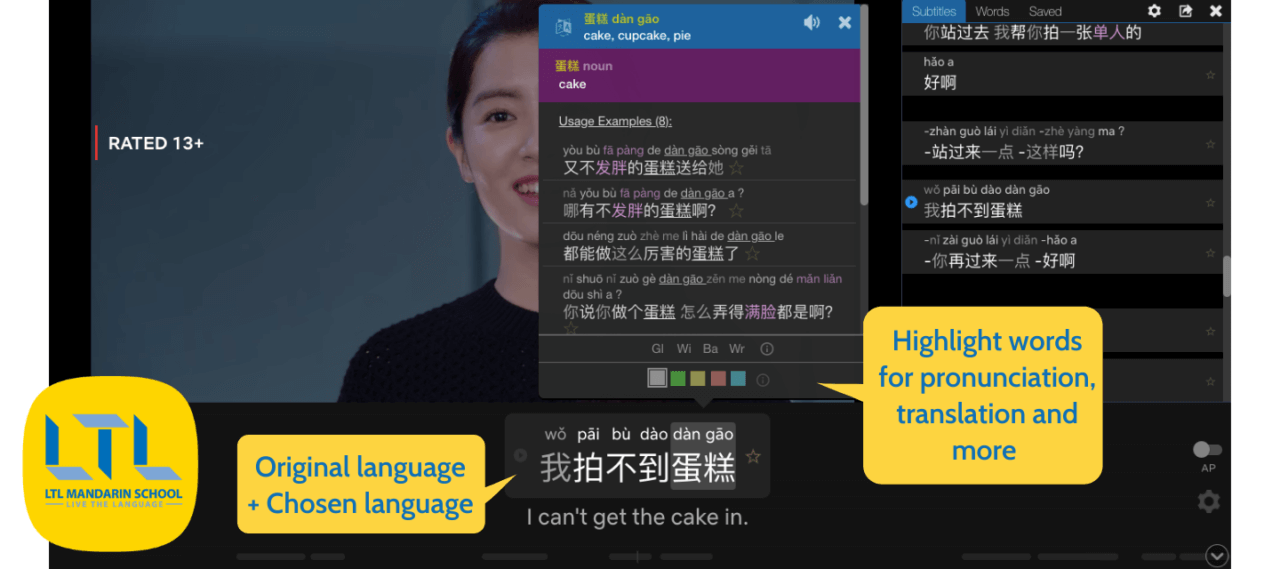
The interface is relatively easy to navigate. An extension pops up beside or below an ongoing video, and users can toggle with it to their liking to better accommodate for the level of active learning they wish to participate in. It allows for a wide range of interactions with extension for a more customized experience.
Source: https://ltl-school.com/language-reactor-netflix/
All one needs to use this tool is a working desktop computer or laptop with the Chrome Browser, regardless of operating system. No extra devices are required, making it very accessible and easy to use. Because this tool is used on videos uploaded to the internet, a stable internet connection is required to use it on websites such as YouTube or Netflix.
Other downsides is that there is no mobile option for this tool, making it difficult to use for anyone who does not possess a laptop or desktop computer. Users are required to create an account once the extension is downloaded so that they may save information regarding word definitions and other study content.
The data is private and only seeable by the user, but is able to save information from past videos to allow for more active learning.

Source: https://www.smarterlanguage.com/how-to-learn-a-language-by-watching-youtube-videos/
Because this tool is not limited to teacher use, students are able to use it privately on their devices, allowing for use in both synchronous and asynchronous teaching.
Language Reactor has over 2 million users, and is continuously expanding and venturing to new video sharing platforms and browsers.
Because this extension cannot share information with other users and other devices, it makes for difficult instructive measures and assessment.
The extension facilitates an active but fun learning experience for users, allowing them to track performance and engage with the content on a personalized level, making it an excellent tool for more dynamic language learning.
Where to Download: https://chrome.google.com/webstore/detail/language-reactor/hoombieeljmmljlkjmnheibnpciblicm
Here's a quick video to get to know all the tools you can use to enhance your language learning experience with Language Reactor:


No comments:
Post a Comment